
AI House Exterior Design: Facade & Curb Appeal Made Easy
Every house gets one shot at a first impression — the facade, the entry, the roofline, and the color that passers-by actually notice from the street. AI house design lets you upload a photo of your own home and see dozens of updated exterior options in seconds: new siding, a different paint color, stone veneer, a refreshed front door — without spending a dollar on an actual renovation.
It’s a photorealistic preview, not a construction blueprint, and that distinction matters. Homeowners planning a refresh, sellers prepping for listing photos, and real estate agents pitching a renovation all use it the same way — to narrow down a direction before committing money to materials or contractors. This guide covers how AI exterior design works, what you can actually change, which architectural styles and color rules apply, and how curb appeal connects to real resale numbers.

How AI Exterior Design Works: Photo to Render
Getting from a snapshot to a finished-looking render takes fewer steps than most homeowners expect, and the underlying process is consistent across tools.
From one photo to many options
You upload a single photo of your facade, shot from the street. The AI analyzes the architecture, the lighting, and the existing materials, then generates a photorealistic render — Remodel AI claims roughly 10 seconds, other AI exterior render tools advertise 15 to 30 seconds. The better models preserve the actual geometry of the house: the roof pitch, window placement and proportions, and shadow direction stay accurate. Only the finish, color, or material changes, which is what separates a usable render from a generic mockup. Some AI facade design platforms report generating more than 2 million designs and offer 3 to 5 free renders with no signup required, which makes it easy to test the workflow before committing to a paid plan.

Preview, not a blueprint
One caveat worth repeating: a render is a preview of an idea, not an engineering drawing. It helps you pick a direction and narrow your options before you pay for a design plan or hire a contractor. For load-bearing walls or any structural change, the render should be treated as inspiration only — bring in a licensed architect or structural engineer before anything gets built.
What You Can Change on Your Home Exterior
The range of materials an AI exterior design AI tool can swap is wide enough to cover nearly every visible surface on the front of a house.
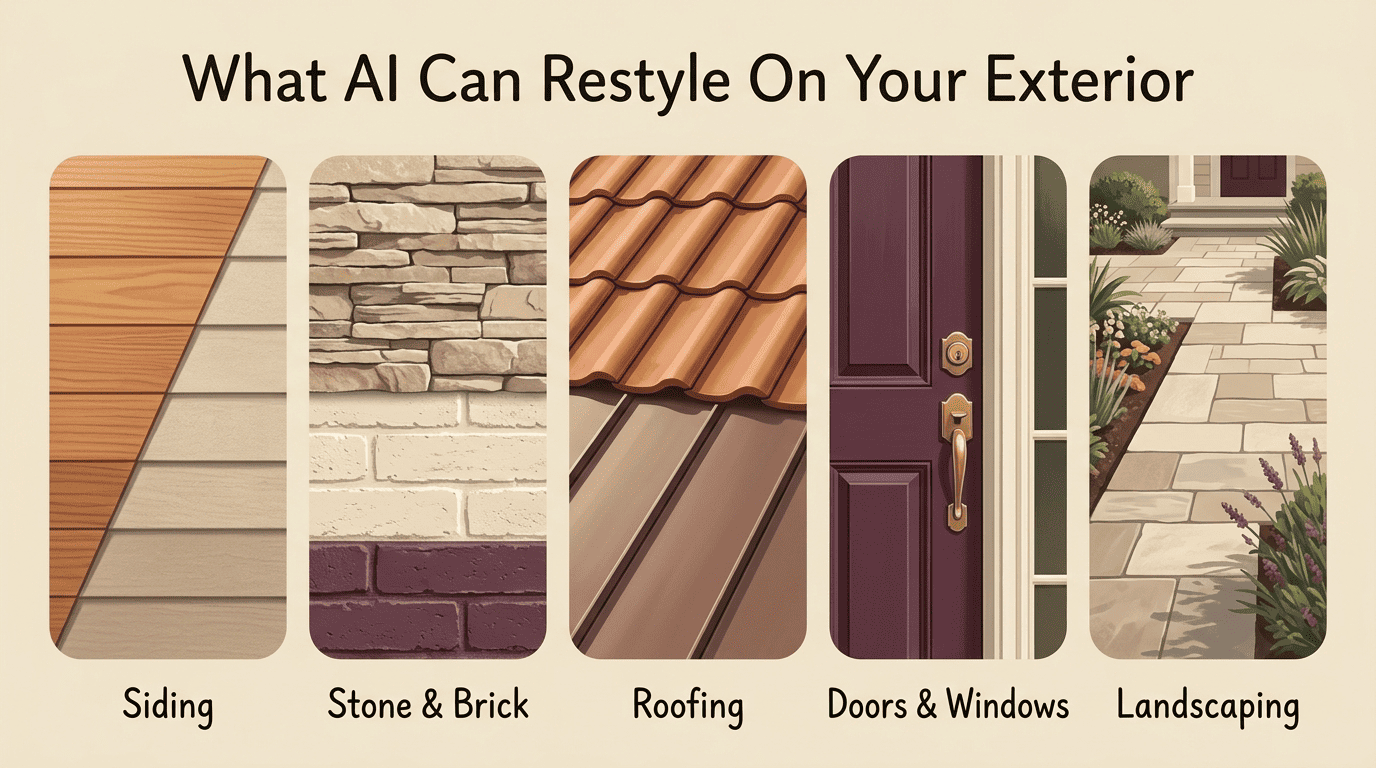
Siding, stone, and brick
Here’s what typically changes on the facade:
- Siding — vinyl (horizontal clapboard, board-and-batten, Dutch lap), fiber cement, and natural or engineered wood such as cedar or redwood
- Stone veneer — natural stone, manufactured veneer, ledgestone, and fieldstone
- Brick — traditional, painted, or finished with a German schmear look
Each material swap keeps the underlying wall geometry fixed, so you’re comparing finishes on the same structure rather than guessing how a new material would actually sit against your roofline and windows.
Roof, doors, windows, and landscaping
Beyond siding and masonry, an AI curb appeal tool typically covers:
- Roofing — asphalt shingle, standing-seam metal, tile or slate, and wood shakes
- Doors — front entry door style and color, plus garage door panel design
- Windows — frame color and trim
- Landscaping and hardscape — walkways, plant beds, and edging
All of these can be adjusted inside the same render, which is what makes it possible to compare a full exterior refresh rather than one element at a time.
| Exterior element | Common AI-visualized options |
|---|---|
| Siding | Vinyl clapboard, board-and-batten, Dutch lap, fiber cement, cedar/redwood |
| Stone & brick | Natural stone, manufactured veneer, ledgestone, fieldstone, painted brick |
| Roofing | Asphalt shingle, standing-seam metal, tile/slate, wood shakes |
| Doors & windows | Front door color/style, garage door, window frame color |
| Landscaping | Walkways, plant beds, hardscape edging |
Facade Styles You Can Try Instantly
Style is where an AI home exterior visualizer earns its keep — swapping the whole architectural language of a house in a single render instead of imagining it from paint chips.
Modern leans on flat or low-slope rooflines, large glass panels, and a mix of metal, stone, and stucco. Farmhouse favors board-and-batten siding, a metal roof, and a wraparound porch. Craftsman brings tapered columns, exposed rafter tails, and a stone-and-wood combination at the base. Colonial is defined by strict symmetry, multi-pane windows, and brick or clapboard cladding. Mediterranean relies on stucco walls, terracotta tile roofing, and arched openings. Coastal style favors light, breezy colors and shutters, while Tudor brings steep gables and decorative half-timbering, and Victorian adds ornamental trim and turret details. Remodel AI lists 11 named styles built around these material signatures; several competing platforms advertise 40-plus style presets.
| Facade style | Signature materials & features |
|---|---|
| Modern | Flat/low-slope roof, large glass panels, metal, stone, stucco |
| Farmhouse | Board-and-batten siding, metal roof, wraparound porch |
| Craftsman | Tapered columns, exposed rafter tails, stone and wood base |
| Colonial | Symmetrical facade, multi-pane windows, brick or clapboard |
| Mediterranean | Stucco walls, terracotta tile roof, arched openings |
| Tudor | Steep gables, decorative half-timbering |
Trying a style that fits your neighborhood
AI makes it fast to try a style, but it’s worth choosing with an eye on the surrounding neighborhood and the home’s existing architecture — a jarring style swap can look out of place next to matching rooflines on the same street. A practical approach: render a few contrasting styles side by side, then compare which one still feels like it belongs.
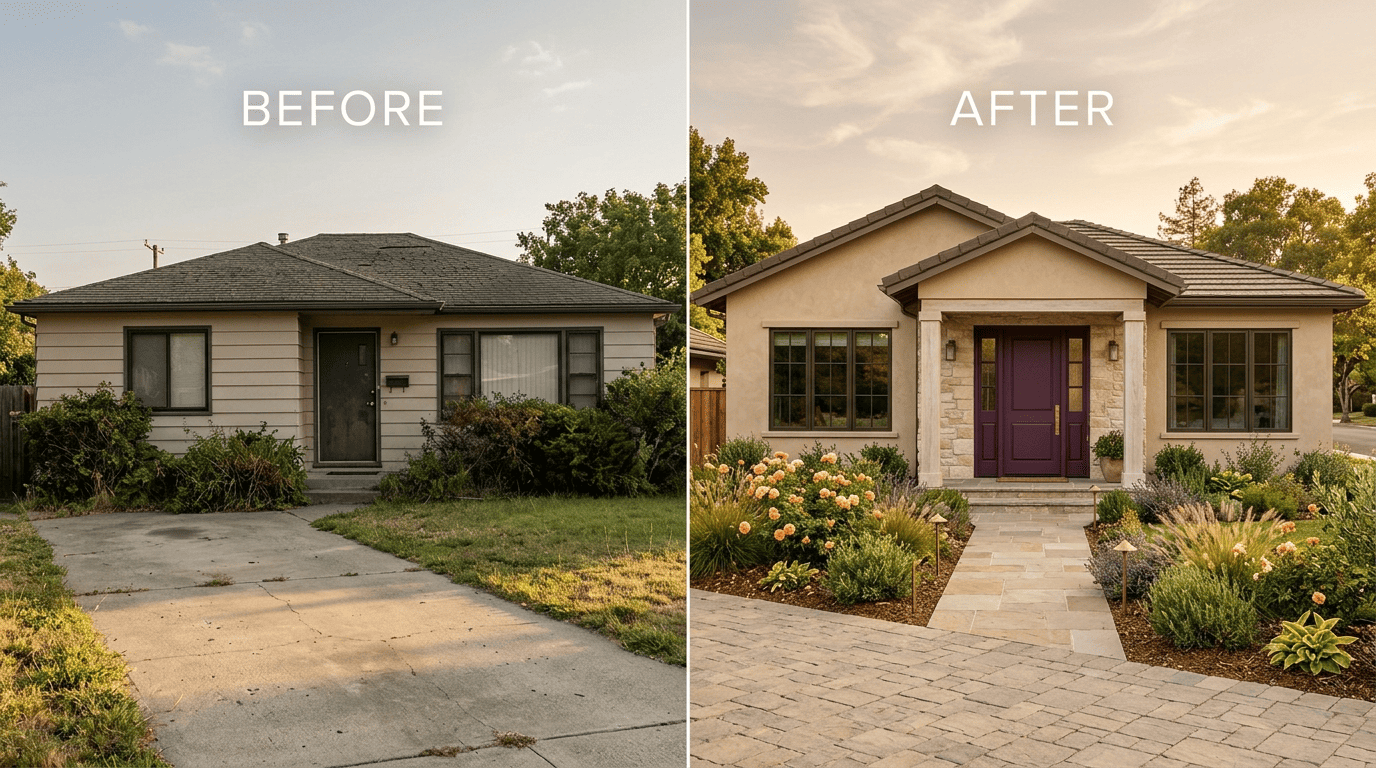
Exterior Color Schemes the Easy Way
Color decisions are where most exterior projects go wrong, because a paint chip in daylight and a full facade in shade rarely match up.
The 60-30-10 rule for facades
A widely used shortcut for exterior palettes is the 60-30-10 rule: roughly 60% of the visible facade is the body color, 30% goes to trim and fascia, and the remaining 10% is reserved for an accent — typically the front door. Repainting a facade in the real world runs $5,000 to $15,000, so a wrong call is an expensive one. Previewing the split with AI before hiring a painter avoids repainting twice.
Testing colors against roof, stone, and light
Paint color needs to be matched against the elements that won’t change — the roof, any stone or brick — and checked under different lighting, since a color that reads warm at noon can look flat by evening. AI renders make this easier by generating several color combinations side by side instead of holding swatches up against the house one at a time.
Curb Appeal and Home Value
Curb appeal isn’t just cosmetic — it shows up directly in sale price and days on market.
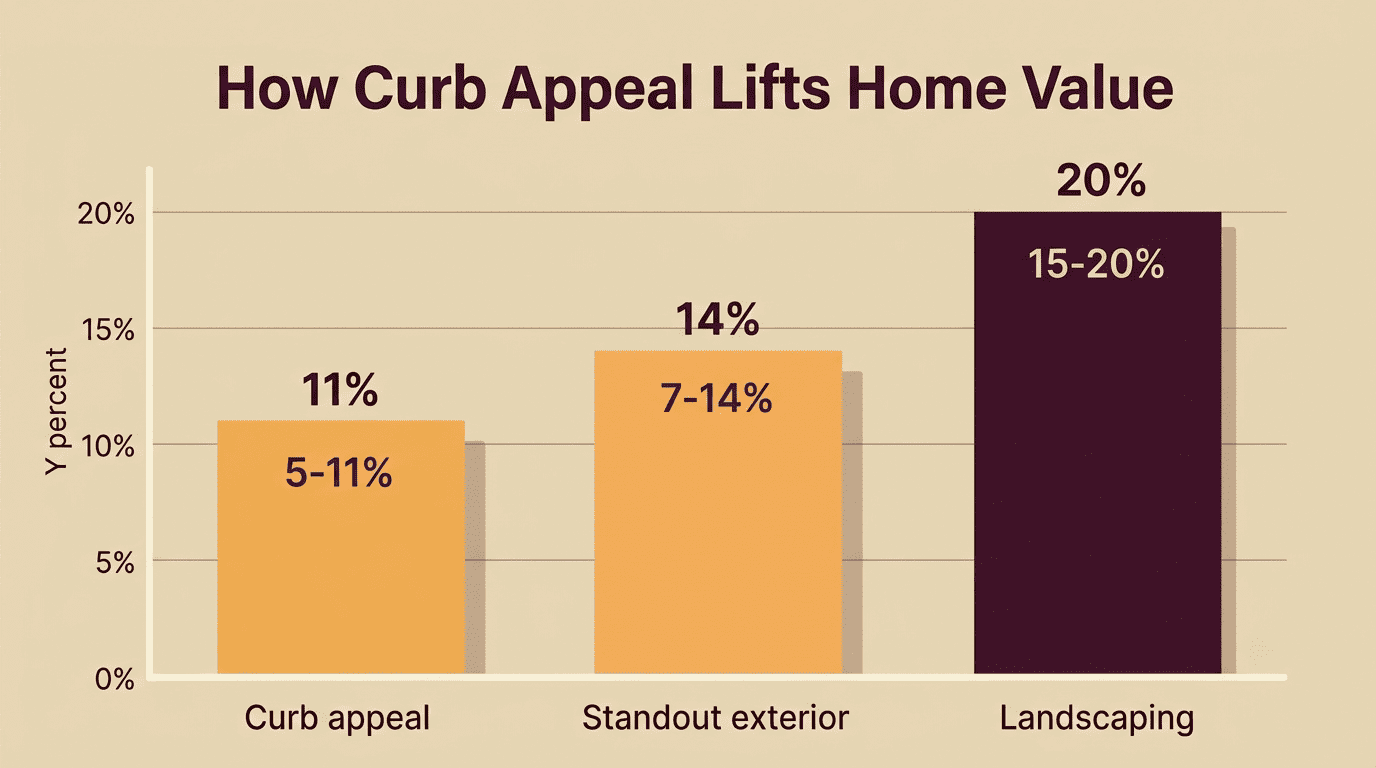
Why the front of your house matters
Curb appeal is the visual attractiveness of a property as seen from the street, and industry research consistently ties it to real numbers: strong curb appeal is commonly cited as adding a 5–11% premium to home value, homes with standout exteriors have been shown to sell for 7–14% more than comparable neighbors, and well-executed landscaping alone can add 15–20% to perceived value. The National Association of Realtors tracks the financial and emotional payoff of outdoor upgrades in its Remodeling Impact Report: Outdoor Features, where 92% of surveyed REALTORS® say they recommend sellers improve curb appeal before listing.
It’s no surprise that nearly all REALTORS® and most homeowners place a high value on the curb appeal of a well-maintained yard.
Britt Wood, CEO, National Association of Landscape Professionals
Highest-ROI exterior upgrades to preview first
According to the Cost vs. Value report from Remodeling Magazine, a handful of exterior projects consistently post the strongest resale returns:
- Garage door replacement — recoups around 100% of its cost at resale nationally
- Steel entry door replacement — recoups close to 100%
- Vinyl siding replacement — recoups roughly 95% of its cost nationally
- Manufactured stone veneer — sits at roughly 100% or more
Since these upgrades already carry strong resale numbers, they’re the ones worth generating first when testing an AI exterior remodel — you’re previewing the changes most likely to pay for themselves.
Your AI Exterior Design Workflow (Step by Step)
A render only helps if the input photo and the process behind it are set up right. Here’s a repeatable sequence:
- Shoot a clean street-view photo in soft light — early morning or late afternoon avoids harsh shadows — and clear the driveway of cars and clutter.
- Pick one theme of change per batch (just siding, or just color) rather than mixing every variable at once.
- Generate several variants of that single change so you have real options to compare.
- Compare renders side by side against the original photo before settling on a direction.
- Assemble a shareable packet — the original photo plus the top two or three renders — for an agent, an HOA board, or a contractor.
- Lock in a concept before requesting bids, so every contractor quotes against the same reference image.
Photo tips and HOA reality check
A few habits make the difference between a usable render and a frustrating one:
- Shoot in soft morning or late-afternoon light rather than harsh midday sun
- Frame the whole facade, including the roofline and any visible landscaping
- Clear cars, bins, and hoses from the driveway before shooting
- Check HOA restrictions before finalizing a color or material — many associations regulate exterior paint, siding, and even fence styles, and a render that looks perfect on screen can still need board approval